Compatibility test
Do Word table borders and merged cells shift in WPS Writer?
In short
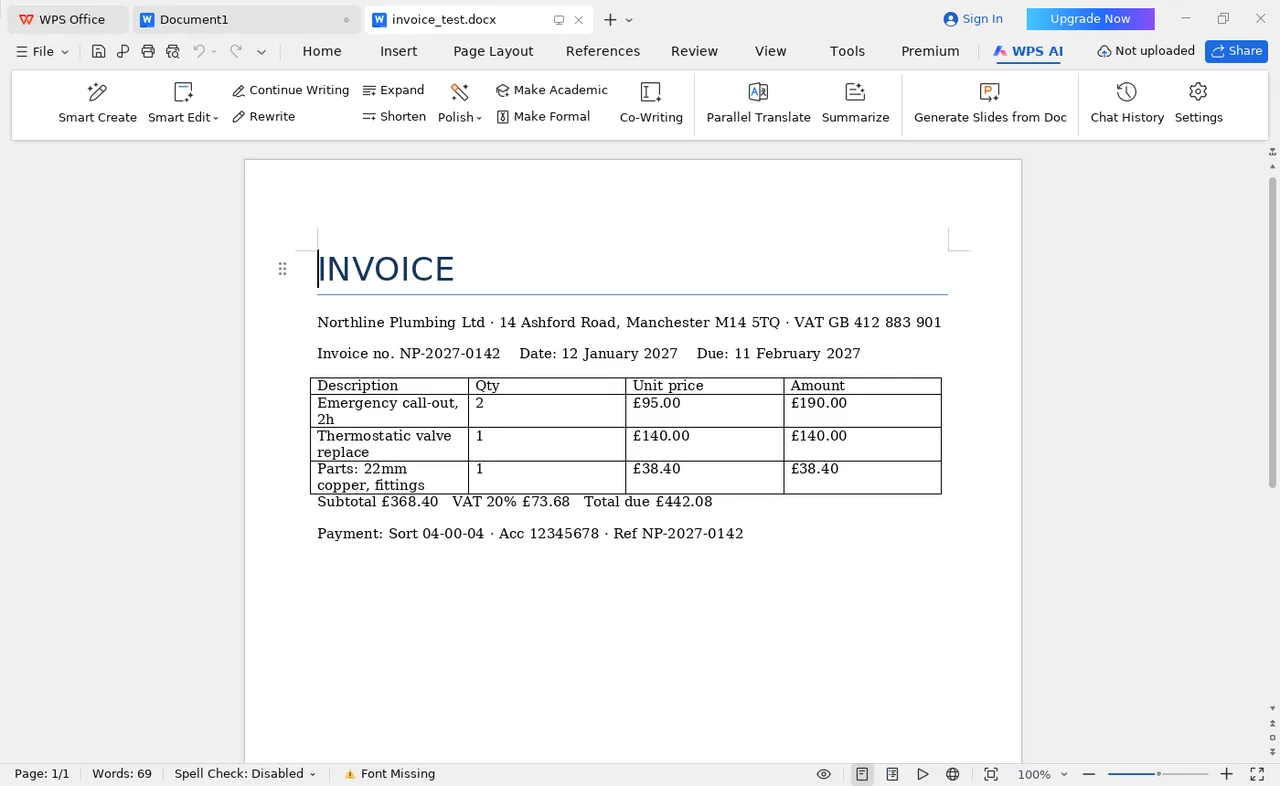
In our test, a DOCX invoice with merged header cells, explicitly-set column widths, cell shading and a right-aligned totals row rendered in WPS Writer without any movement: borders intact, page count unchanged. The one thing that did change was the typeface — WPS reported a missing Calibri and substituted a metrically similar face.
1. The short answer
Tables are the part of a Word document most likely to break when a file changes hands, so they are worth testing directly rather than trusting a general review. In this test they did not break: eight specific table properties were authored into the file, and all eight rendered correctly.
2. What was in the file
We generated a single-page contractor invoice with python-docx, so every formatting property was written explicitly into the XML rather than inherited from a template. The invoice contained:
- A four-column line-item table with a shaded, merged header row
- Explicit column widths in centimetres (4.5 / 2.0 / 2.5 / 3.0)
- Cell shading set on the header row via
w:shd - A subtotal row, a VAT row, and a bold right-aligned total row
- A repeating table header across pages (not exercised — the file fits on one page)
- Calibri as the document font, 10.5 pt body
3. What held
| Property | Result | Observation |
|---|---|---|
| Table borders | Held | All four sides and internal gridlines rendered as authored |
| Merged header cells | Held | Row-span merge preserved without splitting |
| Column widths (explicit) | Held | Set in centimetres; no recalculation |
| Right-aligned totals row | Held | Alignment and bold preserved |
| Cell shading | Held | Header fill rendered identically |
| Page break position | Held | One page in, one page out |
4. The one thing that did change: the font
WPS showed Font Missing in the status bar. Calibri is a Microsoft-licensed typeface and is not installed on a bare Linux system, so WPS substituted a metrically compatible face.
This is the important nuance: the layout survived despite the substitution, not because of it. Metric-compatible fonts have the same character widths, so line breaks fall in the same places. If the substitute had been a different width — which happens with brand fonts and web fonts — the table would not have held.
This is why "it opened fine on my machine" is not a compatibility test. It opened fine because this machine happened to substitute a font with matching metrics. A recipient with a different font set could see a different result from the same file.
5. What to do about it
- Install the Microsoft core fonts if you are comparing output across
platforms. On Linux that means the
ttf-mscorefonts-installerpackage. Without it you are testing font substitution, not layout. - Prefer Calibri, Arial or Georgia for anything a client will open. All three have metric-compatible equivalents in every mainstream suite.
- Send a PDF, not a DOCX, when the appearance must be exact. A PDF embeds the font; a DOCX depends on the recipient. See how to export without layout drift.
6. Method and limits
- File generated with python-docx; all widths and shading written into the XML explicitly.
- Opened in WPS Office 12.1.2 Free on Ubuntu 24.04, captured 11 November 2026.
- Status-bar warning observed directly in the capture, not inferred.
- Not tested: repeating headers across multiple pages, nested tables, or tracked-changes tables.
Elements tested
- Table borders
- HeldAll four sides and internal gridlines rendered as authored
- Merged header cells
- HeldRow-span merge preserved without splitting
- Column widths (explicit)
- HeldSet in centimetres; no recalculation
- Right-aligned totals row
- HeldAlignment and bold preserved
- Cell shading
- HeldHeader fill rendered identically
- Page break position
- HeldOne page in, one page out
Opens the official WPS site. DOCX support is in the free build.