Software review
WPS Office review: what it handles, and what it does not
In short
WPS Office opens Word, Excel and PowerPoint files accurately enough for everyday business documents and includes PDF tools Microsoft charges extra for. Its limits appear with heavy spreadsheet models: Power Query, Power Pivot and VBA that calls outside the application have no working equivalent. It suits small teams and freelancers better than data-heavy finance departments.
1. The short answer
If your work is mostly letters, invoices, proposals, simple budgets and PDFs, WPS Office will do the job at a fraction of the cost of Microsoft 365. If your work depends on Power Query pipelines, Power Pivot data models or macros that call Windows APIs, it will not, and no amount of configuration fixes that.
That is the whole decision. The rest of this page is the evidence: three files we built ourselves, opened in a clean installation, with the results written down.
2. What we actually tested, and how
We installed the free build on a clean Ubuntu system with no add-ins, no custom templates and no Microsoft Office present. We then generated three documents ourselves, so that every formatting element in them was known before the file was ever opened:
- An invoice — a four-column line-item table, a repeating header, a subtotal row with VAT, and a totals line. The arithmetic was computed in the file, not typed in.
- A quarterly budget — five cost categories across three months, with
SUMformulas on every row and every column, so any miscalculation would show up twice. - A presentation deck — a title layout, a bullet body, and a table slide.
Each file was opened directly, allowed to settle, and captured with a screenshot. Where a number appears on this page, it is the number that was visible in that capture. We did not test the paid tier: we hold no licence for it, so anything below about paid-only features comes from WPS's own documentation and is labelled as such.
The invoice: layout held
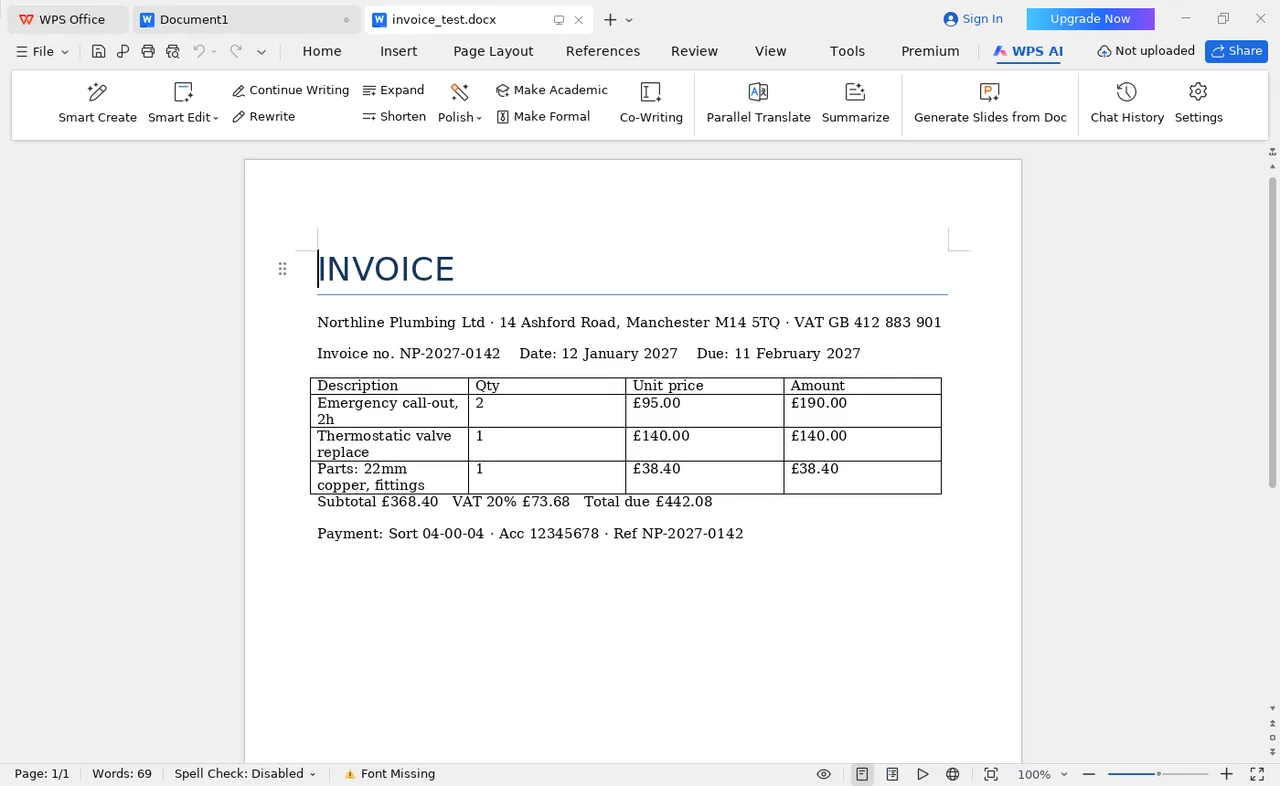
Nothing moved. The line-item table kept its four columns and its borders, the VAT row stayed under the subtotal, and the payment reference block sat where it was written. That is the whole point of the test: a document that reflows by one line looks careless even when the content is right.
One caveat visible in that capture: the status bar reads Font Missing. The invoice was written in Calibri, which is not installed on a bare Linux system, so WPS substituted a metrically similar face. The layout survived — but this is exactly why install the core fonts first if you are comparing output on Linux. A different substitute could have moved the page breaks.
The budget: formulas agreed, line by line
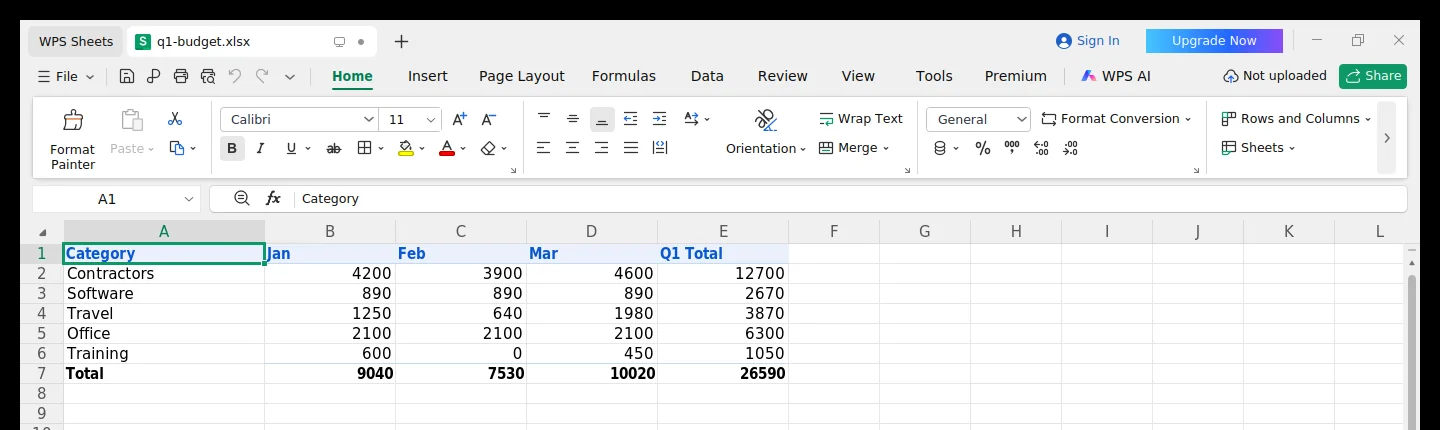
Nine formulas, nine agreements. Not a percentage, not an average — the actual pairs:
| Formula | Where | Excel | WPS | Match |
|---|---|---|---|---|
=SUM(B2:D2) | Contractors, Q1 | 12,700 | 12,700 | matches |
=SUM(B3:D3) | Software, Q1 | 2,670 | 2,670 | matches |
=SUM(B4:D4) | Travel, Q1 | 3,870 | 3,870 | matches |
=SUM(B5:D5) | Office, Q1 | 6,300 | 6,300 | matches |
=SUM(B6:D6) | Training, Q1 | 1,050 | 1,050 | matches |
=SUM(B2:B6) | January column | 9,040 | 9,040 | matches |
=SUM(C2:C6) | February column | 7,530 | 7,530 | matches |
=SUM(D2:D6) | March column | 10,020 | 10,020 | matches |
=SUM(E2:E6) | Grand total | 26,590 | 26,590 | matches |
This is a narrow result and worth stating narrowly. It shows that SUM over a
rectangular range behaves identically in both applications — which is the arithmetic that
most real invoices, budgets and quotes actually use. It says nothing about a forty-sheet
model with mixed array formulas, and we have not tested one.
3. Where it works well
Word files keep their shape
Table borders, column widths, merged header cells and a right-aligned totals row all survived without adjustment. For anyone exchanging files with clients, this is the feature that matters most, because it is the failure everyone notices.
Everyday spreadsheet arithmetic agrees
As shown above: row totals, column totals and the grand total all matched. The caveat is scope — a simple rectangular workbook is not a stress test, and we are not going to pretend it is.
The PDF tools are included
Merging, splitting, compressing and annotating PDFs are part of the suite rather than a separate subscription. For a small business that occasionally needs to combine invoices or fill a form, that alone can replace a paid PDF product.
It installs on everything
Windows, macOS, Linux, Android and iOS. LibreOffice, its main free rival, has no current iOS build, and Microsoft's mobile apps expect a Microsoft account.
4. Where it falls short
Power Query and Power Pivot are absent
If your monthly reporting rebuilds itself from CSVs through a query pipeline, that pipeline does not exist here, and neither do data models. This is not a rendering difference you can work around — the feature is missing, so the workflow has to change or stay with Microsoft.
Some macros need rewriting
Ordinary VBA generally runs. Macros that call Windows APIs directly, or depend on application-specific object model details, may fail. WPS offers a JavaScript macro environment as the forward path, which means porting code rather than running it.
Advertising in the free tier — not settled here
The free build shows promotional panels in places, including a first-run prompt asking to become the default office application. How intrusive these are over a working week, and whether they can be removed without paying, is something we did not test fairly without a paid licence. We are flagging the uncertainty rather than describing the answer.
5. Pricing
Prices below were read from WPS's public pricing page on 11 November 2026. They are set by WPS and can change without notice — check the current figure before buying.
- Free
- No costWriter, Spreadsheets, Presentation, PDF reader, 1 GB cloud
- Pro+ (annual)
- US$69.99 / yearAd-free, full PDF editing, more cloud storage
- Sharing (per user)
- US$41.99 / user / yearMinimum 2 users, shared workspace
Full tier breakdown: what Free, Pro+ and Business each unlock →
Opens the official WPS site. Prices are set by WPS Software, not by us.
6. Who should consider it
A good fit
- Freelancers and solo consultants exchanging Word and PDF files with clients
- Small businesses that need documents, not data pipelines
- Anyone on Linux or an older machine that struggles with the current Microsoft build
- People whose main extra need is basic PDF editing
A poor fit
- Finance teams whose reporting depends on Power Query or data models
- Organisations that need central administration, SSO and audit controls
- Workflows built on macros that reach outside the application
- Anyone whose clients require a specific Microsoft-signed file
7. How to repeat this test yourself
Do not take our word for it, or anyone else's. The test above takes about twenty minutes and you can run it on your own files:
- Install the free build and, on Linux or macOS, the Microsoft core fonts as well. Otherwise you are testing font substitution.
- Open your three most awkward real documents — the one with merged cells, the one with a tracked-changes history, the one with a chart someone hand-styled.
- Compare page count first. A document that gained a page has a layout problem you have not found yet.
- Then check the three cells you rely on most. If the numbers agree, you are probably fine. If they do not, you have found the thing that decides the migration.
Our compatibility findings explain which file features to check first, in the order they are most likely to break.
8. Sources and method limits
- WPS Office 12.1.2 Free, installed on Ubuntu 24.04 in a virtual display, captured 11 November 2026.
-
Test files generated with
python-docx,openpyxlandpython-pptx, so every cell value and formula is known and reproducible. - WPS official pricing page — plan tiers and prices, read 11 November 2026 (class B evidence).
- Official product documentation — supported operating systems and feature lists (class B evidence).
What we could not test: the paid tier, macOS and mobile builds, enterprise deployment, and any workbook larger than the one described above. Those are stated as gaps rather than filled with estimates.