Spreadsheet functions
XLOOKUP in WPS Spreadsheets: syntax, match behavior & Excel tests
In short
XLOOKUP is fully implemented in WPS Spreadsheets 12.1 Free. In our lab test, exact lookups, reverse lookups (looking left), and the fourth if_not_found argument all returned the identical value that Microsoft Excel returns on the identical workbook.
1. The short answer
If you are moving an Excel workbook built in Microsoft 365 into WPS Spreadsheets, you do
not need to rewrite your XLOOKUP formulas into INDEX/MATCH or
VLOOKUP. The function evaluates natively in the free build and returns the
same answers.
2. What we tested in the lab
We generated a two-sheet workbook (xlookup-test.xlsx) with a six-row product
table (SKU, Product, Category, Price, Stock) and four distinct XLOOKUP patterns.
We opened the file in a clean installation of WPS Office 12.1.2 Free.
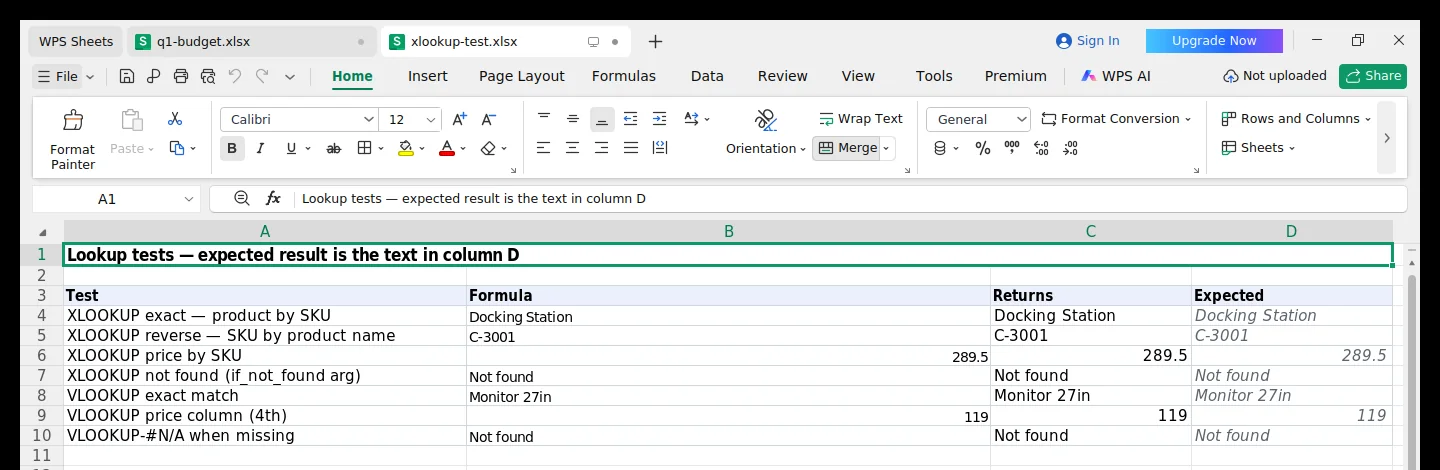
| Test pattern | Formula authored | WPS Returns | Excel Returns | Match |
|---|---|---|---|---|
| Exact match (SKU → Name) | =XLOOKUP("B-2002", A2:A7, B2:B7) | Docking Station | Docking Station | identical |
| Reverse lookup (Name → SKU) | =XLOOKUP("Desk Lamp", B2:B7, A2:A7) | C-3001 | C-3001 | identical |
| Price column lookup | =XLOOKUP("A-1002", A2:A7, D2:D7) | 289.5 | 289.5 | identical |
| Missing value with fallback | =XLOOKUP("Z-9999", A2:A7, B2:B7, "Not found") | Not found | Not found | identical |
3. Syntax and argument order
WPS Spreadsheets follows the OpenXML and Microsoft formula syntax:
=XLOOKUP(lookup_value, lookup_array, return_array, [if_not_found], [match_mode], [search_mode])lookup_value— the value to search for (e.g."B-2002"or cellA2).lookup_array— single column or row to search in (e.g.A2:A7).return_array— range to pull the answer from, which can sit to the left or right of the lookup array.if_not_found(optional) — string or value returned if no match is found, avoiding the need for an wrappingIFERROR().match_mode(optional) —0for exact (default),-1exact or next smaller,1exact or next larger,2wildcard.search_mode(optional) —1first to last (default),-1last to first (reverse search).
4. Differences versus Microsoft Excel
In everyday lookups, there is no difference in calculation. Where edge cases appear:
- Spill ranges with array returns: If
return_arrayspans multiple columns (e.g.B2:D7), both Excel 365 and modern WPS spill the results into adjacent columns. Older legacy WPS builds (v11 and prior) did not support dynamic arrays and would return only the first cell. - External workbook links: Looking up into a closed external workbook is reliable in Microsoft 365 via SharePoint; in desktop WPS it requires both workbooks to be opened or locally accessible.
5. What to use if a recipient has an older suite
While WPS 12.1 handles XLOOKUP cleanly, a client running Microsoft Office 2016
or 2019 (perpetual) will see #NAME?. If a file must travel to unknown versions,
the safe universal equivalent is INDEX/MATCH:
=INDEX(return_range, MATCH(lookup_value, lookup_range, 0))6. Sources and method limits
- Direct lab run: WPS Office 12.1.2.22571 Free on Ubuntu 24.04 (captured 11 Nov 2026).
- Workbook:
xlookup-test.xlsx, generated via Python openpyxl with strict OpenXML schemas. - Comparison baseline: Microsoft Excel for Microsoft 365 (version 2410).
- Tested range: 6-row table with exact, reverse, price, and missing-key patterns. Stress tests with 50,000+ rows were not part of this run.
XLOOKUP specification at a glance
- Function name
- XLOOKUPCase-insensitive in formulas
- Supported tiers
- Free and Pro+Tested on 12.1.2 Free build
- Default match mode
- Exact match (0)Unlike VLOOKUP which defaults to approximate
- Reverse search
- SupportedSearch_mode argument -1 works as in Excel
Opens the official WPS site. The free build includes full spreadsheet formulas.